
Check-in Requirements and Process
Please arrive at least 90 MINUTES BEFORE your first scheduled game and have all players and paperwork with you before you check-in. If your game is 8am, 60 minutes should be fine. Teams checking in Saturday morning on a two day event without having turned in Roster and at least partial waivers will be asked to pay an additional $25.00 This does not apply to single day events.
Day of Event Please Bring:
- If Waivers are done online bring your printed GotSport Roster & Player Passes (We will match up with the roster/waivers online). If they are on your roster then they have done the online waiver. If not, they need a paper one.
- If you end up using Paper Waivers: Bring a Roster (GotSport or hand written/typed), Paper Waivers placed in the order of the players on the roster, and the player passes in the order of both of those. Then be prepared to wait as the process takes considerable time and is why Saturday costs an Extra $25.00 due to slowing everything down.
GOT SPORT NEW DIRECTIONS FOR ONLINE WAIVERS AND PAPERLESS CHECK-IN:
-
If you are having issues with GotSport.com’s system they kindly ask you to submit a report ticket to: GotSport Report Ticket
PLEASE NOTE OTHER GOTSPORT QUESTIONS /FAQ’S can be found BELOW the Waiver Process:
Pro-Am Beach Waiver Process
Step 1 – Coaches or Managers must add the players to the team first before a parent can complete the waiver.
Coaches will need to add the players to the Team Members list if the player is not already included on that list.
Once the player has been added to the Team Members list, the coach will need to notify the parent so they can complete the Pro‑Am Beach Waiver.
Parents completing the waiver:
Step 2:
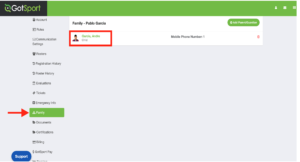
- You will need to log into your parent account here: https://home.gotsport.com/login/, then you will need to go to the Family tab, where you should see your child/player listed.
- From the Family tab, click on the child’s name to open their profile
Step 3:
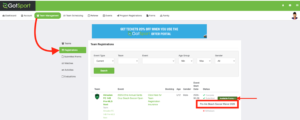
- From the player’s profile, go to the Team Management tab and click Registrations
- From the Registrations tab, click Available Forms next to the team and tournament to view the required Pro‑Am Beach Soccer Waiver.

Step 4:
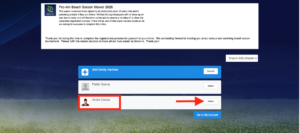
- Once you open the waiver, click Select next to the player’s name to complete it.
- Please make sure you select the player’s account and not your parent account when completing the waiver.
Step 5 – Coaches/Managers – After Waivers have been signed, please follow these steps to add the players to the specific “Event Roster.”
- As a Coach/Manager – How to Build an Event Roster
- Please note that only players with completed waivers will be able to be added to the roster. Once they are added to the roster, they will be automatically approved.
Waiver FAQs for Parents
Scenario 1: Parents have created their own accounts and are not using the email address that the coach/manager created for you when adding the child to the team. Please ask your coach/manager what email address they setup your account with if you don’t know.
Scenario 2: The player is set up as the parent account. In this case, the help article below can resolve this. As a Player/Parent – UserID Issue – Child/Player is Using Parent Email and/or Set as a Parent
Scenario 3: The account says “you must be 18 or older to complete” – in this case, the PARENT needs to go into their own account and change their date of birth so that GotSport knows the parent is older than 18.
Scenario 4: “Error Saving: The enroller’s name must match”
- Parents make it through the waiver but cannot hit submit – parents need to use the same exact name that the parent is registered under when signing the waiver.
- Often solved by copying and pasting the name from the error message or from your profile page. Please make sure that there are no blank spaces before first name or after last name.

THE OLD WAY:
- PRINT A GOTSPORT ROSTER OF ALL YOUR KIDS/Adults. THIS HAS D.O.B. & PICTURE. THEN PRINT A WAIVER FOR EACH KID FOR EACH PLAYER WHO WILL PLAY. SIMPLEST WAY. OTHERWISE FOLLOW THE STEPS BELOW.
The Old Way for Waivers Still Works But Complete All Steps to the Bottom for most Efficiency (Estimated time to download, print/email, collect waivers, type your roster, and follow all the below requirements to do the check-in quick as possible…HOURS).
2. (Invidual Waiver 2026 Revised). VERY IMPORTANT: Waiver Forms for participants UNDER 18 Years OLD need to be signed by his/her parent or legal guardian.
Team Waiver is also available.
3. Photo ID – YOUTH QUALIFYING AGE GROUPS.
PLEASE BE AWARE WE ASK FOR NO — ZERO ORIGINAL ID’S TO BE BROUGHT TO BEACH.
We will accept photocopies of passports, screen shots, electronic shots. All we ask is that you are SUPER organized and follow the steps to NOT slow down the Check-In process.
All youth players must show proof of their date of birth with a National/International Affiliated pass. The following are acceptable:
- AYSO Player Card
- CYSA Player Card
- US Club Soccer Player Card
- SFYSA Player Card
- Other League Player Card showing Both Picture and Date of Birth
- Photocopies/Images of Passports & other Proofs of Age Accepted (See Below)(DO NOT BRING ORIGINALS)
- WE EXCEPT COPIES/SCREEN SHOTS OF ALL ORIGINALS.
FOR RECREATIONAL AGE GROUPS:
If a player does NOT have any of the above, we will accept the following:
- A picture ID with the Child’s Name PLUS a Copy of their Birth Certificate
2b. Photo ID – MEN’S, WOMEN’S, CO-ED and MEN’S OPEN TEAMS. The following are acceptable as proof of identification:
- Driver’s License
- State Issued ID
- Green Card
- Passport (DO NOT BRING ORIGINAL’S, photocopies will suffice)
- Passport Card
- Student ID
- AYSO, CYSA, US CLUB SOCCER Player Card
3. Final Roster Form with all names listed
—————
Important Information
1. All players and coaches must check-in in person
2. Please present the ID’s and signed liability certificates in alphabetical order and have all players lined up in the same order
3. Waiver Forms must have original signatures (fax copies or photocopies will not be accepted)
*If you use the online waiver form and have your complete team then you do NOT need paper waivers.
4. At this point, Pro-Am Beach Soccer Official wristbands will be attached to confirmed players and coaches
5. Wristbands must not be removed unless the player or coach decides to leave the tournament. This is your tournament pass.
Guidelines for a copy of Birth Certificate (Copies not Originals)
1. Can be the following: Documents issued by an appropriate government agency; board of health records; passport; alien registration card issued by the United States Government; a certificate issued by the Immigration and Naturalization Service attesting to age; a certificate of an American citizen born abroad issued by the appropriate government agency; a current driver’s license; or a current identification card issued by DMV.
2. Foreign language birth documents must be accompanied by a properly completed Foreign Document Translation Form.
3. Forms like: Hospital, Baptismal or Religious certificates will not be accepted.
Please note that no exceptions will be made. We highly encourage you to come prepared! It will help us be more efficient and save time!
FRIDAY NIGHT EARLY CHECK-IN: Depending on event, check event page for more details.
Requirements:
1. Completed and Signed Waiver Form is required for ALL players.